
airflow
context
This is a write up that is intended to go in tandem with a presentation that I have done for the Bronco Cyber Security Club. If you missed the presentation, you can view an export of my slides here. And if you want my actual slides, you can find them here
air what?
Apache Airflow. Airflow is a solution for managing scheduled jobs, otherwise known as the notorious “cronjobs”. Airflow is maintained by a number of opensource contributors, and is powered by the Apache Software Foundation. So it is likely that given the product will continue to receive updates and support from community members as well as from the Apache Software Foundation.
If you are not familiar with the Apache Software Foundation, they are the same folks who have created Cassandra, Hadoop, CouchDB, and Guacamole Remote Management Solution.
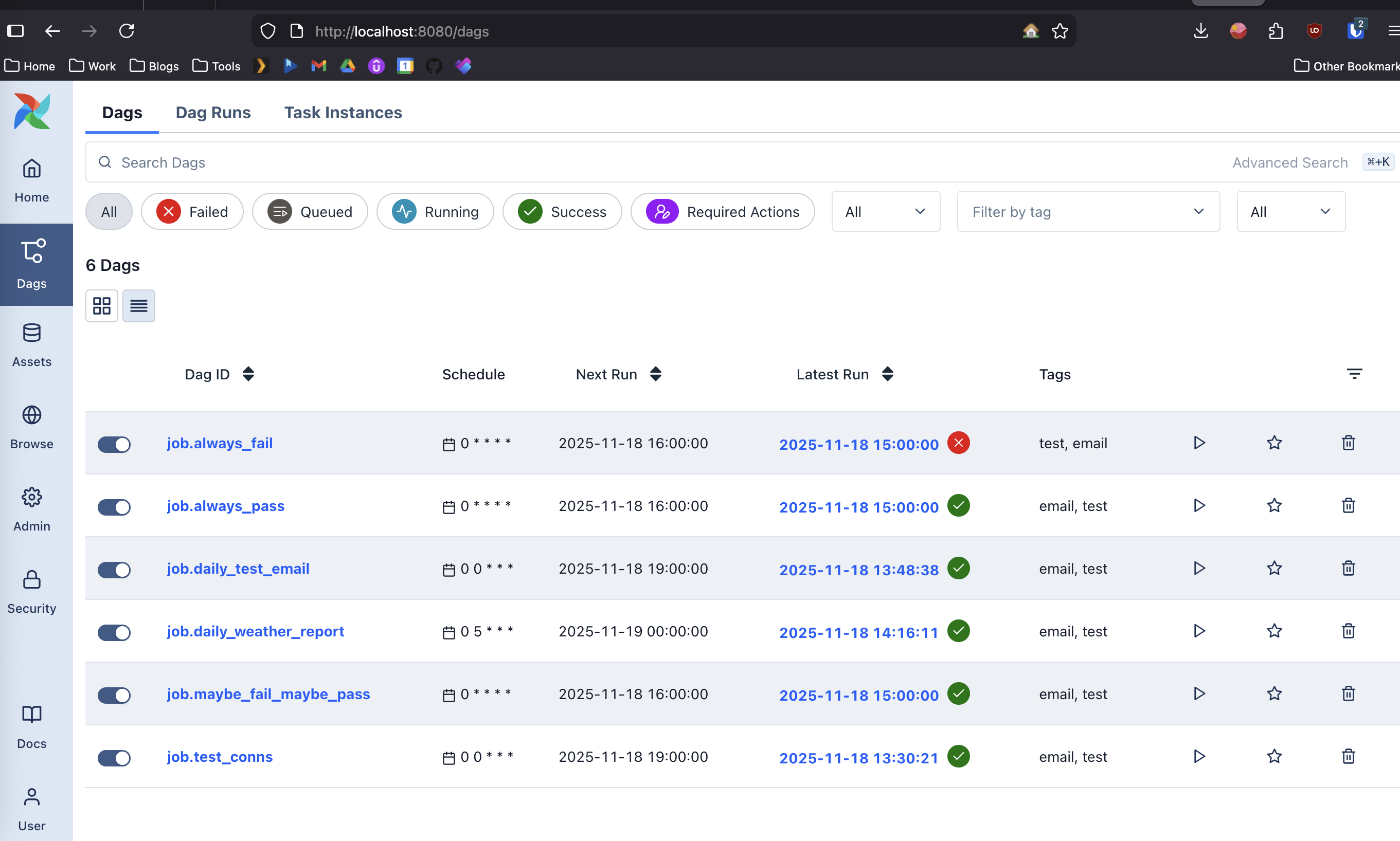
Otherwise, getting back on topic. What is airflow again? Well, its a web dashboard written in python, that intends to be your cron job replacement.
air why?

Well, to be honest with you, when we talk about why airflow, you have to have seen the things i have when a system goes wrong. Otherwise, all of this architecture feels ridiculous.
So to try and simulate some of that experience to you, lets say you are a developer at a business. Your boss comes to you to automate some menial task for the business. Lets say for example, sending a weekly news letter to employees about updates on the things the company has been doing.
the old world

Lets first imagine a world without airflow for a moment. We will call it “the old world”.
In the old world, your boss came to you and talked to you about sending this email to employees on some of the things that are happening at the business. You’ve identified, that you basically want the program to scrape the news section of your website, and generate a pretty email containing snippets of the most popular articles of the week, and then send it out to all the employees on Fridays, so they have something to read in the morning. Once you have the script written to do this, the first problem you will encounter, is where to place this script?
Do you place it on a new and unique server? or do you place it on the server with the website?
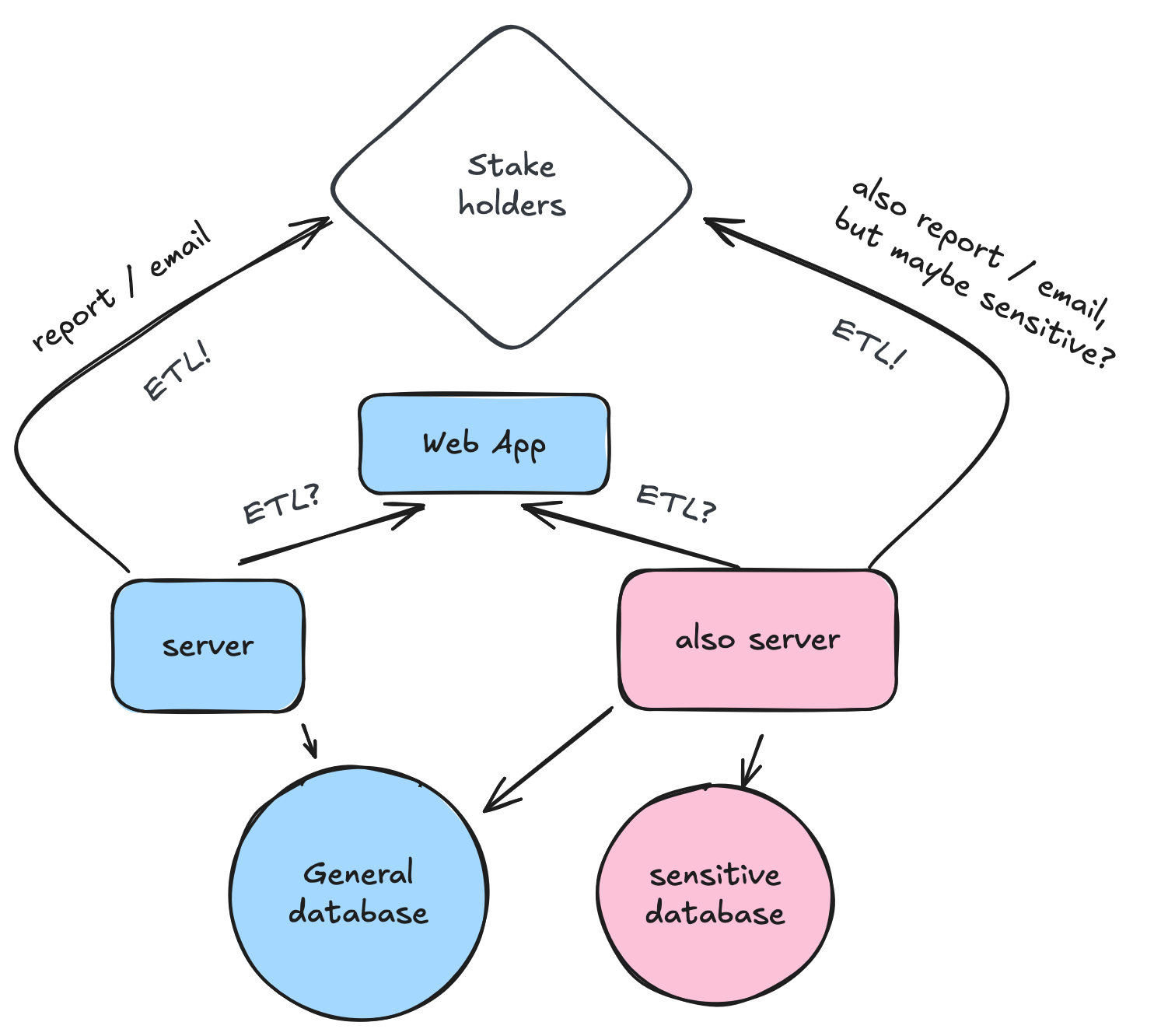
A lot of scripts will do a Extract Transform and Lift operation from one program to another. In the diagram, there is only two servers pictured, but in reality there may be hundreds. Without adequate logging and observability, when something goes wrong, you can spend hours logging into a server and viewing cronjobs. Id also like to highlight the fact that
Once you think you have the right idea of where to put the script, you have to think about what language you wrote the script in? Is it an interpreted script? (IE Python?) do you have a server with the correct version of python available on it? Should you install that version of python on the server? Will it break everything when you do that? Depending on the languages you are writing, and the versions you are using, you may have servers with deprecated OS’s and depricated languages. This is one of the hardest things to deal with when working with interpreted languages.
On the flip side of that, you may be using a language that requires system dependencies be installed and available for the system (think php, and cpp/c). Upgrading the language, or upgrading the dependencies would require re-writing the code. Sometimes though, it also becomes a security concern.
Is there a security concern for running the script on that server? As in you need only that server to have access to that database? What happens when your script inevitably fails, does it email you? Does it email a shared inbox? Does it leave a log file somewhere telling you how and why it failed?
Most environments i’ve worked in, are mainly systems of inconvenience. It takes an EXTRAORDINARY amount of work to make a script observable, idempotent, and noisy. It also comes down to sometimes the crunch the organization might have in building the connection between two systems. You may have anywhere from a few days, to a few months to do it right. In either instance, its hard to get it right.
Say you shortcut on the observability aspect, and you shortcut on the idempotency of the task. And you’ve gone ahead and placed the script on the server. Well a few weeks later its broken and your boss is mad. Your losing hundreds of dollars a day, and they call you up and go “fix these emails by tomorrow!”. Well now you’ve got to go through a process like below:
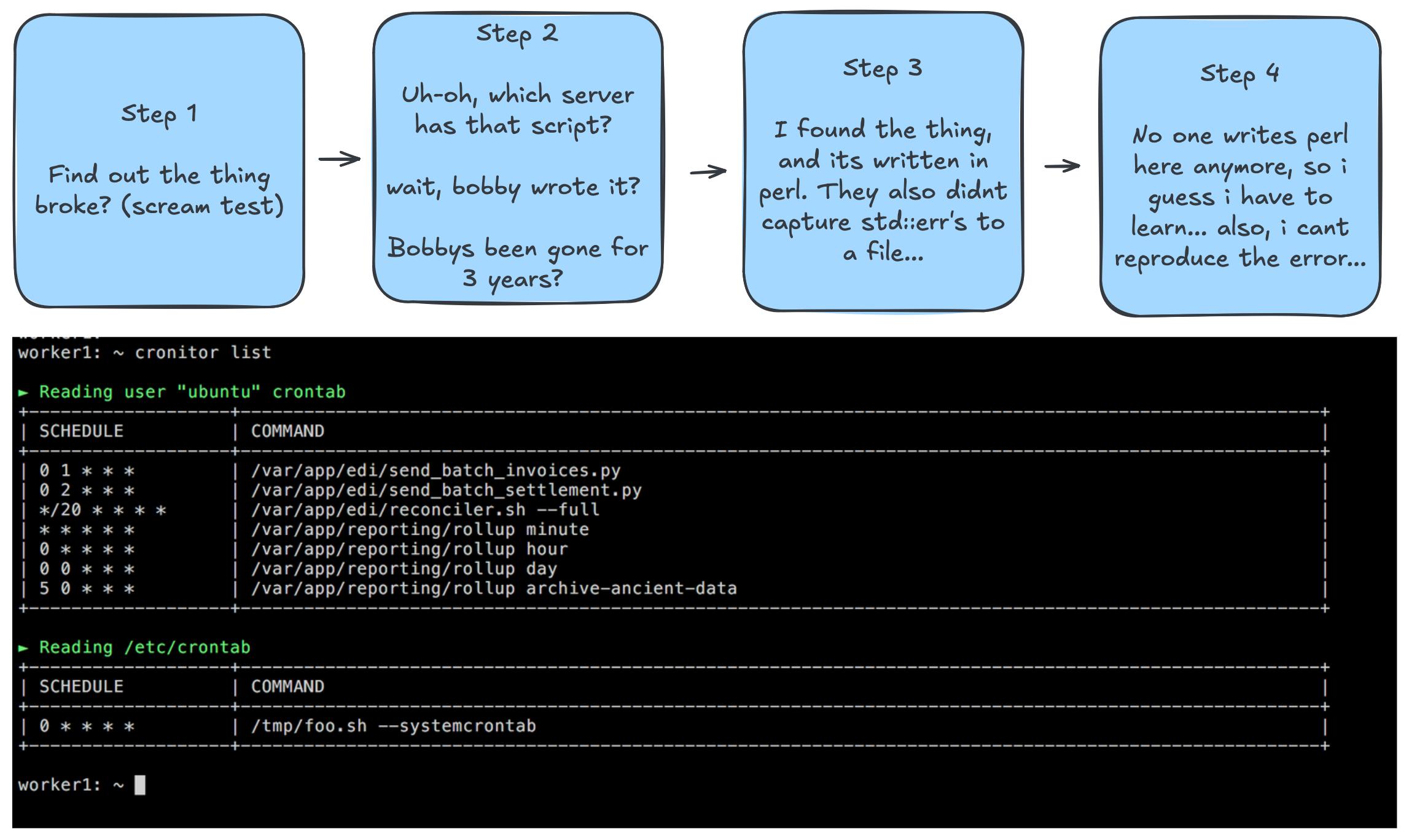
And if you have no documentation, or 100s of servers finding that program can take a while… And once you get to the server, and you find the script, you cant seem to find the error. Or you cant reproduce it. So you write down in your notes where the script was, and you modify it a little bit to produce a log file, and you wait until the next time.
But eventually you quit (because your boss is terrible or something). And a new guy comes in, and he does the whole process over again.
the new world
Now, lets think about the world with airflow.
Lets go through the same exact scenario as before. Your boss comes to you and goes, send this email to these people.
Change Control and Consistency
With airflow, you can automatically assume that you will need to put it into the airflow server. It will have been discussed and determined already that all the code will meet a certain standard to be put into airflow (i.e a version of python.).You start by looking at your airflow instance, you get to review previous code written by others, and see the shared libraries and tooling left behind by current and former developers. This will help immediately in your ability to draft up some kind of scheduled emailer. Because the server is also already being used for how many other scripts, you’ve probably got ports open, and you’ve got the system dependencies installed (lol if you have ever installed the oracle thick client you will understand why someone may never want to install that thing again).
Even better than having it installed on a server, is configuring airflow to use docker, which is what we will be doing in this example. (Docker will allow us to declaratively stand up our server with the required dependencies and versions, and manage them as text files in some form of version control.)
Dockerizing the application makes airflow portable, and replicable, meaning that now you dont need a dev, and prod server, because your dev server is your machine. It also forces the server configuration (for the most part) into the docker machinery, allowing for you to full send into the dev ops world.
Observability
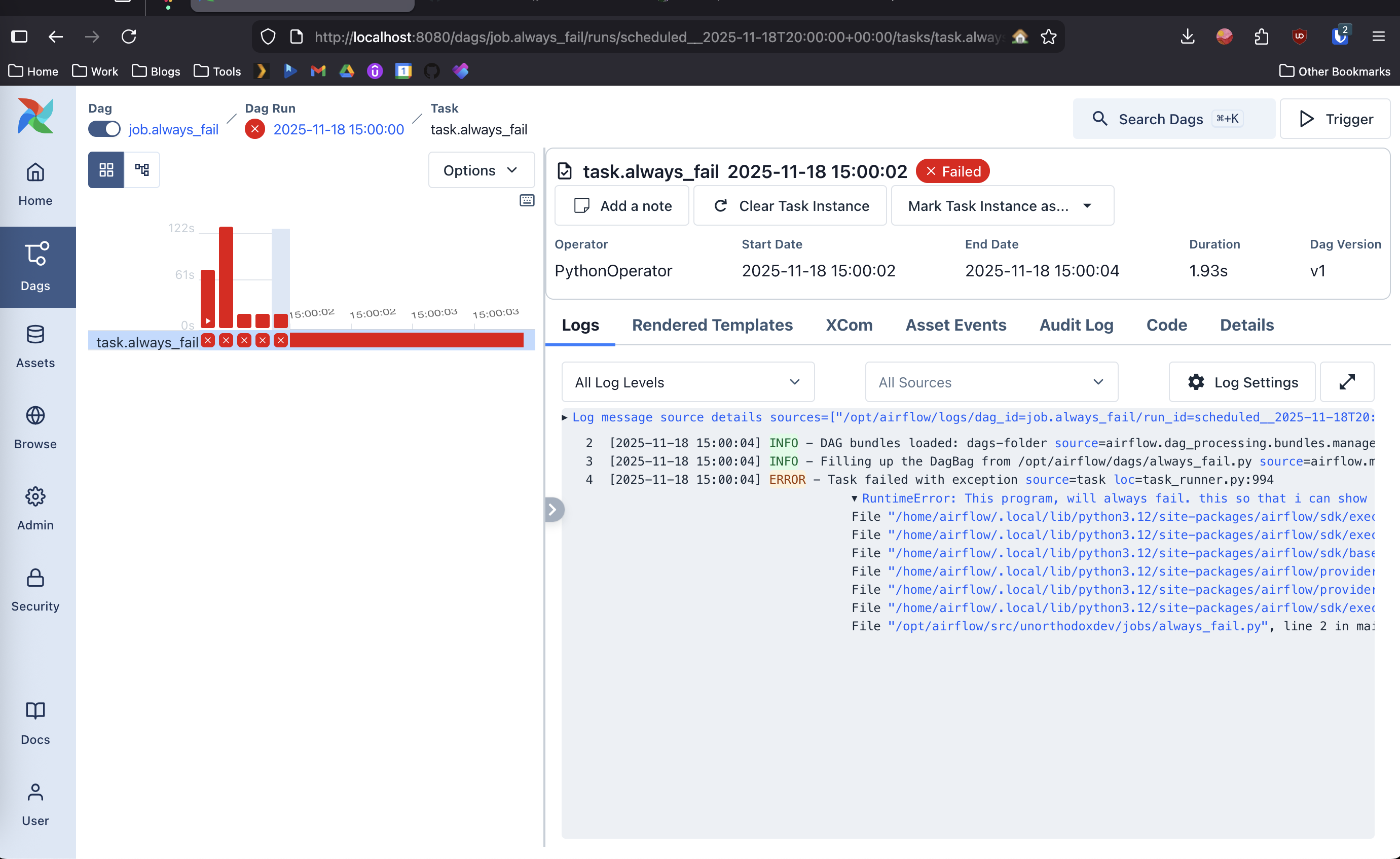
Now, say that your script failed to run or had an error. Airflow has built in logging, and it can be configured to notify you on failure relatively simply. It also gives you one place to put everything, so instead of searching the 100’s of servers your organization may have, you can then log into the web dashboard and review the log files. Above is a screenshot of what that would look like.
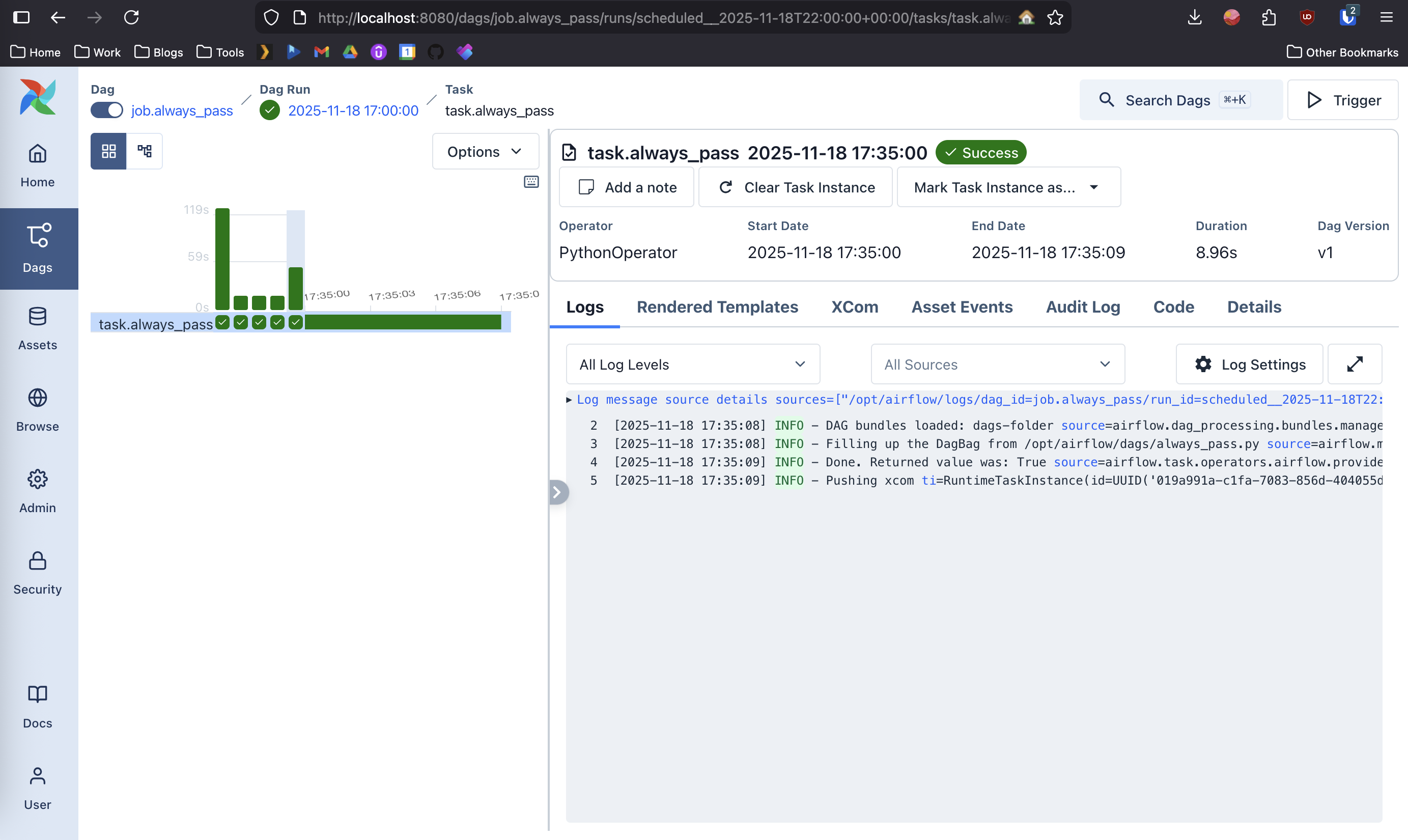
Now, say that your boss comes back, and goes i did’nt get that email 😡. Well you can come in now, and check if the job was successful. Maybe your boss wrote a rule a few months ago trashing every email that comes in on Friday (as one does). Now they’ve forgotten about it and actually miss reading that email. So they come to you saying your not sending them the email. Well depending on how you configure your program, you could have it log to airflow, each recipient of the email, and when the email was sent to them. Allowing you to view the success or failure of your job. Above is a screenshot of what that would look like.
Airflow
So again, airflow is not just a shinier cronjob tool (looking at you cronitor). It is at the end of the day, a tool, and can be used as such, even if you are good at using the tool or not. But what airflow almost always guarantees is that it gives you predictable, observable, and repeatable automation. No matter the occasion whether you’re shipping a newsletter, or managing thousands of B2B etl workflows. Airflow forces you as a developer to centralize your logic, configuration, and documentation into one system.
If i’ve sold you on what airflow is, then id recommend you pull down my demo repo here https://github.com/unorthodox-dev/jobs.unorthodoxdev.net. Inside of that repo, i have a few jobs configured that will give you a good understanding of how airflow runs, but it has a few shortcomings. One of which is the lack of a secrets manager which airflow recommends you roll your own.
Getting started with my demo
- Clone the repo
git clone [email protected]:unorthodox-dev/jobs.unorthodoxdev.net.git cdinto the repository- Create a prod .env file:
cp sample.env .env - Modify your .env to be live:
vim .env - run
docker compose up --build --forec-recreate
Adding jobs
So you want to add a job, well to do that i recommend you use python. Though at the end of the day, because its a docker container you can use whatever language you would like. Though to add a job, you need to do really three main things.
1. keep all business logic in job/
- this directory should contain pure python models. When you expand this, create a folder for anything that is going to have more than one file for business logic.
- don’t keep secrets in source control (?!)
- use typed function signatures and keep modules importable on their own.
for example, if we wanted to do the news letter function, you can see send_test_email.py
# we start by importing our shared email module from unorthodoxdev.lib
from unorthodoxdev.lib.notify.email import EmailConfig, send_email, get_config
import httpx
from datetime import date


# define a non shared module.
def get_weather(lat: float, lon: float):
    # Build the Points API endpoint
    points_url = f"https://api.weather.gov/points/{lat},{lon}"

    headers = {"User-Agent": "AirflowHttpxClient/1.0 ([email protected])"}

    with httpx.Client(headers=headers, timeout=10.0) as client:
        resp = client.get(points_url)
        resp.raise_for_status()
        points_data = resp.json()

        forecast_url = points_data["properties"]["forecast"]

        resp = client.get(forecast_url)
        resp.raise_for_status()
        forecast_data = resp.json()

    # Today = first period
    today = forecast_data["properties"]["periods"][0]
    return {
        "temperature": f"{today['temperature']} {today['temperatureUnit']}",
        "short_forecast": today["shortForecast"],
        "detailed_forecast": today["detailedForecast"],
    }


def main():
    lat, lon = 42.2897, -85.5856  # kalamazoo

    weather = get_weather(lat, lon)

    today = str(date.today())
    message = f"""
Good Morning!

Todays weather report is as follows:

\tTempature: {weather["temperature"]}
\tShort Forcast: {weather["short_forecast"]}
\tDetailed Forecast: {weather["detailed_forecast"]}

Have a great day!
    """

    print(message)
    send_email(get_config(subject=f"Weather Report for {today}", body=message))


if __name__ == "__main__":
    main()
2. Put reusable code in ’lib/'
Remember, we want to share as much code as we can amongst our modules, and its not uncommon to have many differnt programs do some of the same things over and over again (its why we automate them right?)
So lets look at our reusable module send_email() in email.py
import smtplib
import os
from dataclasses import dataclass
from email.message import EmailMessage


# Frozen dataclass prevents accidental mutation.
@dataclass(frozen=True)
class EmailConfig:
    smtp_server: str
    smtp_port: int
    smtp_user: str
    smtp_pass: str
    recipient: str
    subject: str
    body: str
    # ...

  # ...

def send_email(cfg: EmailConfig):
    msg = cfg.to_message()

    if cfg.smtp_port == 465:
        with smtplib.SMTP_SSL(cfg.smtp_server, cfg.smtp_port) as server:
            server.login(cfg.smtp_user, cfg.smtp_pass)
            server.send_message(msg)
    else:
        with smtplib.SMTP(cfg.smtp_server, cfg.smtp_port) as server:
            server.starttls()
            server.login(cfg.smtp_user, cfg.smtp_pass)
            server.send_message(msg)
You can see that we have built out a class to control our configuration for the function, but we have also placed a shared function (can be class if you really want) into the lib, that we use in two different jobs. Later you may want to implement a secrets library that gets extended into the airflow install, and since airflow is written in python the easiest way is to write your backend in python as well.
3. Generating a dag
Dags are otherwise known as Directed Acyclic Graphs. Dags essentially, map out in a visual way the order in which your job is ran, and it reflects its relationships and dependencies. The dags that I have in the demo repo are simple, and easy to recreate. Though you can eventually make complicated dags, that have jobs that can run in any order, but must run to be considered complete. Or you can have a dag that has a structured order, as in task a, then task b.
Airflow also has recently implemented a feature called Human In The Loop or HITL. HITL jobs are great, for those once a quarter jobs that require a manual fire off when the menial tasks are done, and require some kind of acknowledgement or confirmation of a value.
In general, i have no advice on creating a dag, other than that it would be ideal for you to create one ideal dag of each way you want to run a type of job and keep them as template_hitl, template_any, template_ordered, template_basic, etc…
airflow cont.
Again, airflow is not magic, but it forces discipline. You are forced to write your code in an idempotent way, you are forced to isolate your dependencies, and you are forced to share your code amongst other functions. Going through all of these changes will position your organization in a far better way than they were before, and helps enable you to standardize how jobs run. If you are genuinely interested in this, id recommend you to clone down the repo, and stand up your own ETL’s. Expand the airflow image, and add new jobs to it.